背景
国际化(internationalization, 简称i18n)是一个能够让产品适应多地区和多语言的能力。对于国际化公司而言,产品的使用者往往是来自不同国家、不同地区的用户人群,对平台使用语言的要求不尽相同。因此,有必要实现一套前端国际化通用方案,旨在提供语言环境适配和切换的能力,降低用户阅读门槛,从而提升平台使用体验和工作效率。
三、目标
针对目前各平台项目没有提供国际化功能,将制定一套前端通用国际化方案,帮助平台开发者快速接入国际化功能而无需手动实现。
结合目前技术选型和业务情况,国际化方案需要支持的能力包括以下几点:
支持多语言展示与切换(核心)
默认语言、多类型语言选择与切换
支持翻译资源管理
非硬编码,业务方可以通过线上平台维护翻译资源,支持线上修改资源、扩展多语言,从而降低维护成本。
支持cli初始化国际化配置
cli初始化项目时支持添加国际化功能(可选)
支持自动识别/切换语言
识别地区,自动切换到当前地区对应的语言环境
兼容UI库国际化
UI库内置组件的国际化同步
四、理想技术模型
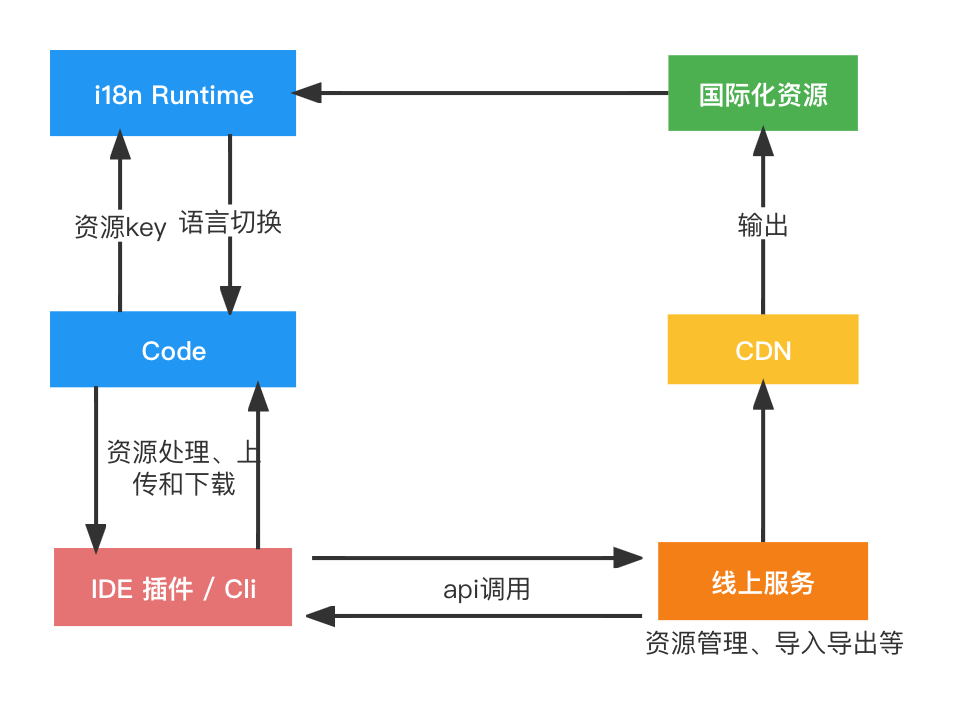
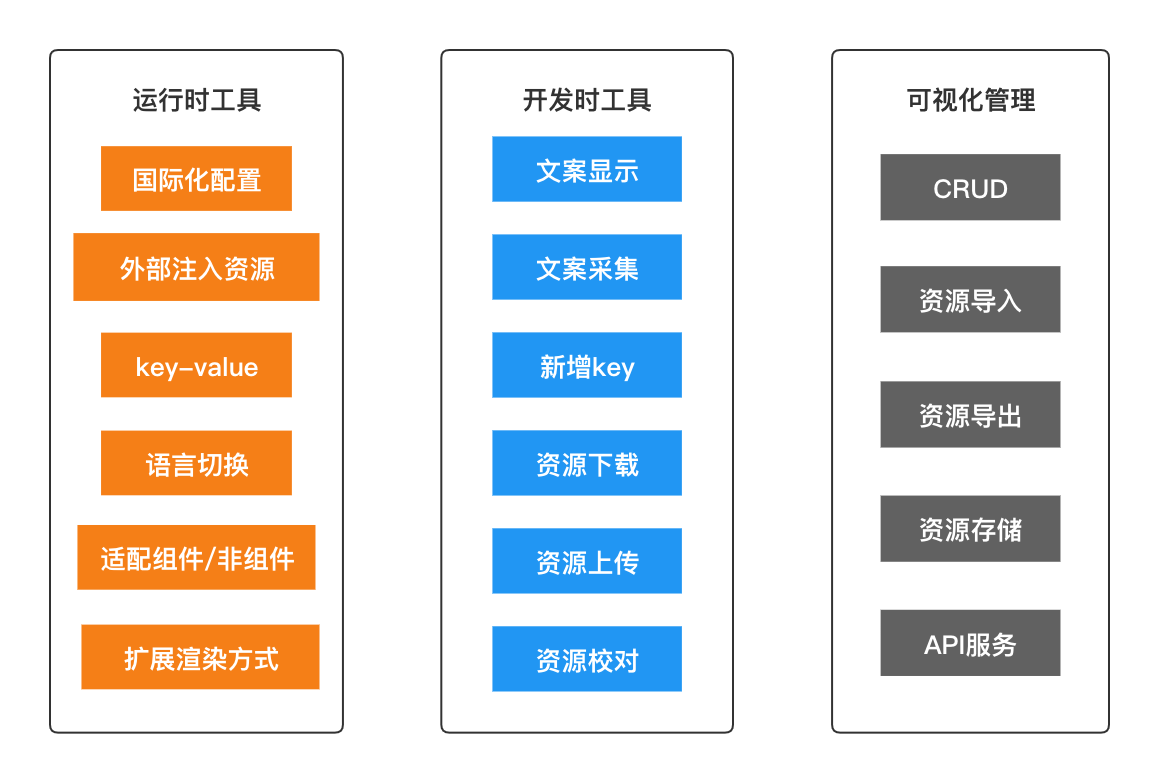
五、开源方案(运行时)
1. react-intl
react-intl是formatjs(JavaScript国际化库)的一部分,其主要针对基于react框架开发的项目来实现国际化, 通过使用其提供的API来实现对文本、日期、货币、数字的翻译。
全局配置
1)自定义配置语言字典。语言字典就是各类语言所对应的数据映射集,以文件的形式存储,必须保持相同的格式。如:
en_US.js:
1
2
3
4
5
| const en_US = {
"hello" : "Hello World",
"test": "Test, {name}"
}
export { en_US }
|
zh_CN.js:
1
2
3
4
5
| const zh_CN = {
"hello" : "你好世界",
"test": 测试, {name}"
}
export { zh_CN }
|
2)生成全局配置
1
2
3
4
5
6
7
8
9
10
11
|
import { zh_CN } from './zh_CN';
import { en_US } from './en_US';

const defaultLocale = 'en-US'
const messages = {
    'en-US': en_US,
    'zh_CN': zh_CN,
    ...
}
export { defaultLocale, messages }
|
2)在项目入口文件中引入react-intl提供的国际化容器组件IntlProvider,包裹在根组件外面, 并导入默认全局配置:
1
2
3
4
5
6
7
8
9
10
11
| import ReactDOM from 'react-dom'
import APP from './APP.jsx'
import { defaultLocale, messages } from 'common/config/i18n'
ReactDOM.render(
<IntlProvider locale={defaultLocale} defaultLocale={defaultLocale} messages={messages[defaultLocale]}>
<App />
</IntlProvider>,
document.getElementById('root')
)
|
使用方法
导入全局配置后,我们就能使用react-intl提供的组件/API来展示当前语言匹配的文案了。react-intl支持component、hoc、hook两种使用方法:
Component写法:
使用react-intl提供的**组件,并设置id**为语言字典中对应的key,组件会自动解析为span标签,并自动填充对应的文案:
1
2
3
| import { FormattedMessage } from 'react-intl';
<FormattedMessage id="hello" />
|
如果文本中包含变量,则需要通过values字段传入文本模板中需要解析的数据。比如:
1
2
3
| import { FormattedMessage } from 'react-intl';
<FormattedMessage id="test" values={{ name:"Shawli" }} />
|
HOC写法:
使用react-intl提供的injectIntl可以对class组件进行包装,通过props向组件注入intl对象,然后通过调用intl.formatMessage获取翻译文案:
1
2
3
4
5
6
7
8
9
10
11
12
13
14
15
16
17
18
19
20
21
22
| import React from 'react';
import { injectIntl } from 'react-intl';
class Content extends React.Component {
constructor(props) {
super(props);
this.state = {
};
}
render() {
const { intl } = props
return (
<div>
{
intl.formatMessage({ id : hello})
}
</div>
);
}
}
const ContenIntl = injectIntl(Content)
export default ContenIntl;
|
Hook写法:
支持React Function Component的Hook写法,可以使用react-intl提供的useIntl来实现:
1
2
3
4
5
6
7
8
9
| import { useIntl } from 'react-intl';
const TestComponent = () => {
const intl = useIntl();
return (
<div>
{intl.formatMessage({id: 'hello'}, {name: 'Shawli'})}
</div>
)
};
|
umi支持
umi框架内置国际化功能,其底层也是基于react-intl来实现的,我们可以通过其提供的api来实现国际化能力:
1)通过umi提供的useIntl来获取formatMessage等api来进行具体的值绑定:
1
2
3
4
5
6
7
8
9
10
11
12
13
14
15
16
17
18
19
| import React, { useState } from 'react';
import { useIntl } from 'umi';
export default function () {
const intl = useIntl();
return (
<button type="primary">
{intl.formatMessage(
{
id: 'name',
defaultMessage: '你好,旅行者',
},
{
name: '旅行者',
},
)}
</button>
);
}
|
- 使用setLocale来设置切换语言,默认会刷新页面
1
2
3
4
5
6
7
| import { setLocale } from 'umi';
// 刷新页面
setLocale('zh-TW', true);
// 不刷新页面
setLocale('zh-TW', false);
|
优缺点
优点:
- 支持多种方式来实现语言翻译,兼容Class组件和Function组件,用法丰富;
- 通过props的方式来注入语言包,可以在不刷新页面的情况下切换语言
缺点:
- 只能应用于视图层,例如React.Component。对于Vanilla JS文件(原生JS),无法对其进行国际化
- 对于injectIntl包裹的组件,要获取Component的实例,react-intl不能使用常规方法如:this.refs.xxx
2. react-intl-universal
基于react-intl的一些缺陷,react-intl-universal是阿里巴巴团队提供的一个国际化方案。它也是基于react-intl开发,提供了一个可以用来加载当前地区配置的单例对象,并允许非react组件(原生JS)使用这个库。
初始化配置
通过调用intl对象的init方法,并传入currentLocale和locales数据来初始化配置:
1
2
3
4
5
6
7
8
9
10
11
12
13
14
15
16
17
18
19
20
21
22
23
24
25
26
27
28
29
30
31
32
33
34
35
| import React, {Component} from "react";
import intl from 'react-intl-universal';
// common locale data
require('intl/locale-data/jsonp/en.js');
require('intl/locale-data/jsonp/zh.js');
// app locale data
const locales = {
"en-US": require('./locales/en-US.js'),
"zh-CN": require('./locales/zh-CN.js'),
};
export default class App extends Component {
state = {initDone: false};
componentDidMount() {
this.loadLocales();
}
loadLocales() {
const currentLocale = intl.determineLocale({
urlLocaleKey: 'lang'
})
intl.init({
currentLocale: currentLocale || 'en-US',
locales,
}).then(() => {
// After loading CLDR locale data, start to render
this.setState({initDone: true});
});
}
...
|
使用方法
1) get
状态更新后,通过intl提供的get方法来获取数据
1
2
3
4
5
6
7
8
9
| ...
render() {
return (
this.state.initDone &&
<div>
{intl.get('SIMPLE')}
</div>
);
}
|
2) getHtml
也可以使用intl.getHtml来返回html结构:
1
2
3
4
5
6
7
8
9
10
11
12
13
14
15
16
| // zh.json
{
"TIP": "<span style='color:red'>span元素</span>"
...
}
// Component
...
render() {
return (
this.state.initDone &&
<div>
{intl.getHtml('TIP')}
</div>
);
}
|
3) 切换语言
1
2
3
4
5
6
7
8
9
10
| ...
const setLocale = locale => {
return intl.init({
currentLocale: locale,
locales: locales
}).then(() => {
window.location.search = `?lang=${locale}`
})
}
...
|
优缺点
优点
- 使用简单,只包含三个主要的API和可选的帮助器
- 支持在浏览器和Node中运行
缺点
3. react-i18next
I18next是一个历史悠久且非常完整的国际化框架,不仅适用于浏览器,也能够在其他javascript环境(Node/Deno)上运行。react-i18next则是基于i18next开发的一个适用于react/react-native的国际化方案。它能够支持组件方案,囊括class组件、HOC和Hook。同时也提供了丰富的插件支持,比如可以用插件检测当前系统的语言环境,从服务器或者文件系统加载翻译资源等。
初始化配置
1)自定义配置语言字典。i8next规定使用JSON文件来存储翻译文案,如:
en.json:
1
2
3
4
| {
"hello" : "Hello World",
"test": "Test, {name}"
}
|
zh.json:
1
2
3
4
| {
"hello" : "你好世界",
"test": 测试, {name}"
}
|
2)导入资源,通过init方法初始化配置,并导出i18n实例:
index.js:
1
2
3
4
5
6
7
8
9
10
11
12
13
14
15
16
17
18
19
20
21
22
23
24
| import i18n from 'i18next'
import { initReactI18next } from 'react-i18next'
import translation_en from './en.json'
import translation_zh from './zh.json'
// 资源
const resources = {
en: {
translation: translation_en
},
zh: {
translation: translation_zh
}
}
i18n.use(initReactI18next).init({
resources,
lng: 'en',
interpolation: {
escapeValue: false // react already safes from xss
}
})
export default i18n
|
2)在项目入口文件中导入配置,即可支持初始化流程:
1
2
3
4
5
6
7
8
9
| import ReactDOM from 'react-dom'
import APP from './APP.jsx'
...
import '@/config/i18n'
ReactDOM.render(
<App />,
document.getElementById('root')
)
|
使用方法
1)组件中使用:
这里仅以Hook写法举例,其他用法参考官方文档:https://react.i18next.com/
1
2
3
4
5
6
7
8
9
10
11
| import React from 'react';
import { useTranslation } from 'react-i18next'
export default function () {
const { t } = useTranslation()
return (
<button type="primary">
{t('hello')}
</button>
);
}
|
2)原生JS中使用:
1
2
3
| import i18n from 'i18next'
...
const val = i18n.t('test', { name: 'Shawli' })
|
切换语言
i18next提供了切换语言的API,可以直接使用:
1
2
3
4
5
| import i18n from 'i18next'
...
const changeLanguage = (lng) => {
i18n.changeLanguage(lng);
};
|
优点
- 使用hook方式,简单易用。
- 提供切换语言,不用手动实现
- 方案完整性高,同时支持浏览器端和服务端
4. 方案对比
基础对比
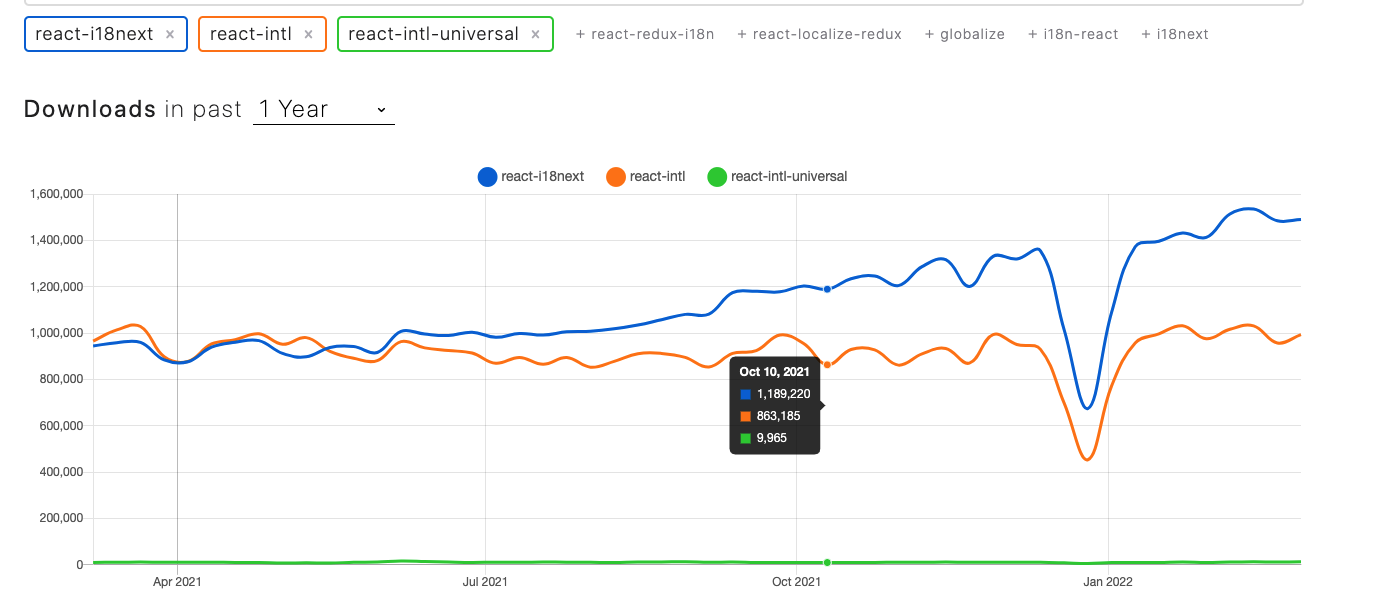
总结:react-i18next在包大小、下载时间、下载量上具有绝对的优势
|
react-intl |
react-intl-universal |
react-i18next |
| 包大小(kB) https://bundlephobia.com/ |
56.7 |
86.5 |
20 ✅ |
| 下载时间(ms)4G |
19 |
32 |
7 ✅ |
| 下载量 |
900000+ |
10000+ |
1400000+ ✅ |
特性对比
|
react-intl |
react-intl-universal |
react-i18next |
| 无感切换语言 |
✅ |
❌ |
✅ |
| Vanilla JS支持 |
❌ |
✅ |
✅ |
| Hook写法支持 |
✅ |
❌ |
✅ |
| 模板解析支持 |
✅ |
✅ |
✅ |
| 内置切换语言API |
❌ |
✅ |
✅ |
| 无破坏性 |
❌(装饰器的代码实现会改变ref) |
✅ |
✅ |
| 初始值获取 |
手动传入 |
url / cookie / localStorage |
localStorage/url |
| 是否需要Provider |
✅ |
❌ |
❌ |
| 服务端支持 |
❌ |
✅ |
✅ |